
How to Manage Banking Information?
Want to get paid faster? Rentablez lets you add your bank account details so they appear on invoices and payment receipts—making it easy for customers to know exactly where to transfer the money.
To manage banking information, navigate to Settings > Financial Settings > Bank Accounts.
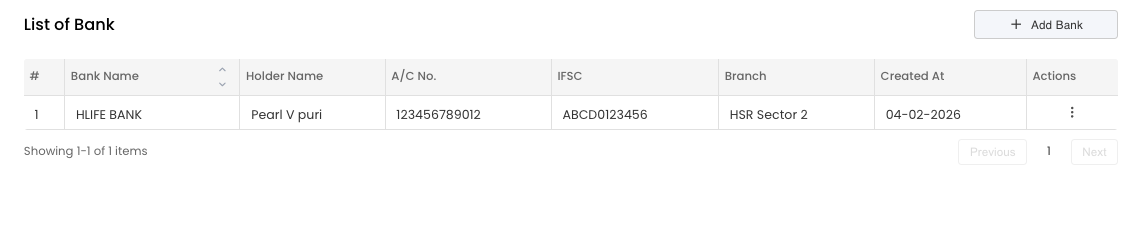
Your bank accounts list shows all configured accounts. You can manage multiple banks, set one as default, and toggle active/inactive status for each.
Adding a Bank Account
You can store detailed information for multiple bank accounts (e.g., a primary operating account and a separate savings account).
The banking details form allows you to capture all necessary routing info:
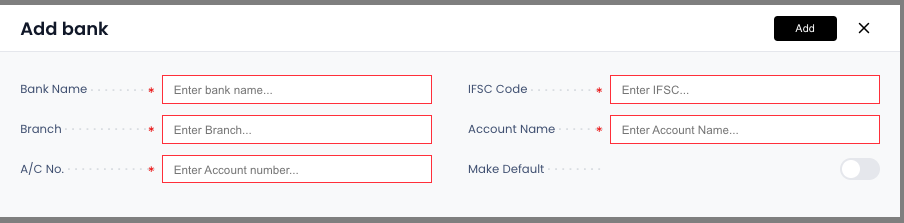
Fill in your complete bank details including Bank Name, Account Holder Name, Account Number, IFSC Code, and Branch information.
Required Fields
- Bank Name: The official name of the bank (e.g., “HDFC Bank”).
- Account Name: The business name registered with the bank.
- Account Number: The full bank account number.
- IFSC Code: The specific code required for bank transfers.
- Branch Name: Using the correct branch name helps prevent failed transfers.
Managing Accounts
Editing Bank Details
- Find the bank account in your list → Click Edit
- Update any details (bank name, account number, IFSC, etc.) → Click Save
Deleting Bank Accounts
If you no longer use a bank account, you can delete it from the list.
Important: Only delete bank accounts that haven’t been used in any invoices or transactions. Deleting an account that appears on historical invoices may cause reference issues.
Default Account
You can mark one account as the Default (shown with a green (d) marker). This account’s details will appear on standard invoice templates unless you manually select a different account.
To set a default account:
- Click Edit on the desired bank account
- Toggle on Make Default
- Click Save
Where is this used?
- Invoices: Bank details appear in the “Payment Instructions” section of invoices.
- Payment Recording: When a staff member records a payment as “Bank Transfer,” they can select which specific bank account the money hit.
With Rentablez managing your banking details, every invoice goes out with the right payment instructions automatically.